Best Energy Monitors for EV Charging
Short answer
The best energy monitor for EV charging is the Emporia Vue 3 with 16 circuit sensors at around $199.99, which measures the main service and every branch circuit you clamp. Note that no monitor controls anything: to actually avoid a panel upgrade you need a load management device such as the Emporia Pro, which throttles the charger instead of just watching it.
The best energy monitor for a house with an EV charger in it is the Emporia Vue 3 with 16 circuit sensors at around $199.99. It clamps two sensors around the service conductors and up to sixteen around individual branch circuits, reports in real time and keeps a running history. If you want the same coverage without the data leaving your network, the Refoss 16-circuit monitor at around $169.99 supports local control instead.
Now the part that most of this category gets wrong, and the reason this page exists. A monitor does not manage anything. It is an ammeter with a memory and a phone app. It will watch your main breaker sail past its rating and report the event beautifully afterwards. If what you actually need is for the charger to back off when the oven, the dryer and the heat pump all come on at once, you need a load management device, and that is a different product with a different price. The Emporia Pro at around $599 is a charger with that capability built in, and it is on this page for exactly that reason.
Top pick, whole-panel energy monitor
Best for most panels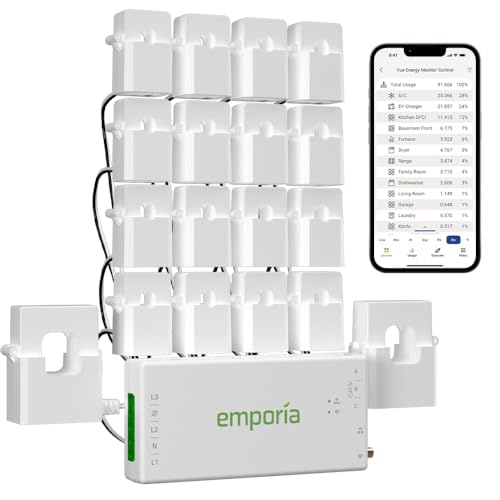
EMPORIA
Emporia Vue 3 Energy Monitor, 16 Sensors
$199.99
Sixteen circuit sensors plus main sensors, which is enough to instrument a whole residential panel rather than a guess at it. It reports real-time usage and keeps a running history, which is the kind of measurement an optional-method load calculation can be built on, and sixteen channels leaves spare capacity once the obvious circuits are covered.
- Circuit sensors
- 16
- Main sensors
- 2
- Reporting
- Real time
- Radio
- Wi-Fi
- Controls load
- No
- Install
- Inside panel
Paid link. Price shown when researched.
What is the difference between monitoring and load management?
This is the distinction the whole category blurs, usually in the product title. Monitoring is measurement. A monitor uses split-core current transformers, which are hinged rings of iron with a coil wound around them, clamped around a live conductor. The magnetic field from the current in that conductor induces a proportional current in the coil, the monitor reads it, and you get amps. Nothing in that chain touches the flow of power. The conductor does not know the ring is there.
Load management is control. A load management device also measures, but it is wired so that its output decides whether the charging circuit is energised, or it talks to the charger over a control line and tells it to reduce the current it offers. When total household demand climbs toward the service rating, it either sheds the charger entirely or steps it down from 48 amps to 24, or to whatever the remaining headroom allows. That is an active intervention, and it is the only one of the two that changes what your panel is allowed to carry.
| Device type | What it measures | What it controls | Can it avoid a panel upgrade? | Typical price |
|---|---|---|---|---|
| Whole-home monitor, mains only | Total service draw | Nothing | Only as evidence | $99.99 |
| Circuit-level monitor, 8 to 16 sensors | Every branch you clamp | Nothing | Only as evidence | $149.99 to $267.75 |
| Charger with built-in load management | The service and itself | Its own charging current | Yes, directly | $599.00 |
| Standalone load management relay | The service | The whole charger circuit | Yes, directly | Roughly $500 to $900 |
Read the third column and then the fourth. The two monitors control nothing, and the honest answer in their fourth column is that they help only as evidence. The two controllers change the electrical behaviour of the house. If your load calculation came back over the limit and somebody sold you a monitor as the fix, you were sold the wrong product. The full argument about which of the two you need, and what each costs against a service upgrade, sits in load management versus a panel upgrade, and the mechanics of the controllers themselves are in load management devices.
Why does a monitor make a load calculation defensible?
Here is where a monitor earns its price even though it controls nothing, and it is a genuinely large financial lever that almost nobody explains.
There are two accepted ways to calculate whether a service can carry a new EV circuit. The standard method adds up square footage, appliance nameplates and fixed loads with prescribed demand factors, and it is deliberately conservative. It has to be, because it is a paper exercise about a house nobody has measured. Run a 200 amp service through it with a modern kitchen, electric water heating and air conditioning, and the answer frequently comes back with no room for a 60 amp charger circuit even though the house has never drawn close to 200 amps in its life.
The alternative is the optional method, which is allowed to use actual recorded maximum demand rather than nameplate arithmetic. The code contemplates demand data gathered over a period of time and then increased by a safety factor before the new load is added. That is exactly what a circuit-level monitor produces: a continuous record of what the service really peaked at, through a cold snap and a heat wave and a holiday dinner, with the number attached to a timestamp instead of an assumption.
In practice a house that fails the standard method often passes the optional method with room to spare, because real households do not run every nameplate load simultaneously. A 200 dollar monitor left in place through a season and then handed to an electrician, can be the difference between a charger circuit and a service upgrade quoted at 3,000 to 7,000 dollars. Run your own numbers first through the panel load calculator to see which side of the line you are on, and if it is close, this is the cheapest evidence you can buy.
Two caveats, and they are real. The electrician performs the calculation and decides whether your data is usable, not you. And the recording has to cover a period that includes your genuine peak, which means the coldest and hottest stretches of the year rather than a mild fortnight in spring.
Can a monitor prove your time-of-use bill is right?
Yes, and this is the second reason to own one. A time-of-use rate plan charges different prices per kilowatt hour depending on the clock, and EV charging is the load that makes those plans worth switching to, because it is large, predictable and entirely shiftable. The catch is that you are trusting two schedules you cannot see: the one in the car or the charger, and the one the utility applied to your meter.
A monitor with a sensor on the charger circuit settles that argument. It shows kilowatt hours by the hour, so you can see the session start at the moment the off-peak window opens rather than fifteen minutes before it, and you can see whether a session that ran long spilled into a peak period at three times the rate. A smart charger reports a session total, which is useful, but a total cannot tell you when the energy was consumed and the whole rate plan is about when.
It also catches the failure mode nobody expects: the charger and the car both holding a schedule, with the car waking, finding the charger offering nothing, and sleeping until morning. On the monitor that shows up as a flat line where a charging session should be. Work out what the rate plan is worth to you before you switch with the time-of-use savings calculator, and read time-of-use rates for how the plans are structured.
Starter: what is the house actually drawing?
The starter tier answers one question, and it is the only question that matters before you shop for a charger: how close does this house get to its service rating on its worst day? You can answer that with two sensors on the service conductors and nothing else. Everything above that is diagnosis rather than diagnosis plus treatment.
Starter tier: $99.99 to $169.99
Whole-house measurement, and enough circuit sensors to explain a peak once you have found one.

EMPORIA
Emporia Vue 3 Energy Monitor, Base
$99.99
The base kit, with main sensors clamped around the service conductors and no circuit sensors. It tells you what the whole house draws minute by minute, which is the single number that decides whether a charger circuit fits, and it does that for under a hundred dollars.
- Circuit sensors
- 0
- Main sensors
- 2
- Sees
- Whole house
- Radio
- Wi-Fi
Trade-off No per-circuit detail, so when the peak appears you cannot tell which appliance caused it.
Check price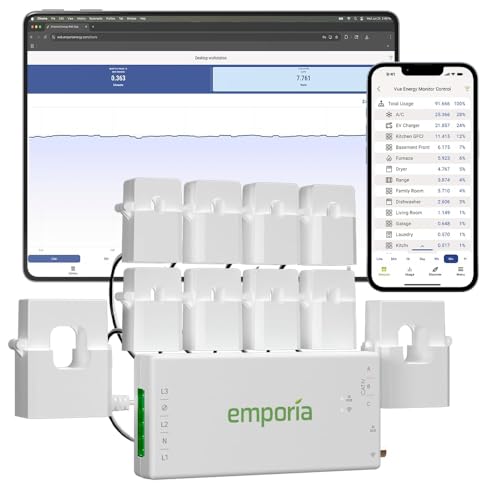
EMPORIA
Emporia Vue 3 Energy Monitor, 8 Sensors
$149.99
The same monitor with eight circuit sensors, which covers the loads that actually move a peak: the range, the dryer, the water heater, the air handler and the charger. Eight is usually enough to explain every spike a residential panel produces.
- Circuit sensors
- 8
- Main sensors
- 2
- Sees
- The big loads
- Radio
- Wi-Fi
Trade-off Adding sensors later means opening the panel again, so buy the count you want the first time.
Check price
Refoss
Refoss Smart Home Energy Monitor, 16 Circuits
$169.99
Sixteen 60 amp circuit sensors with local control, meaning the data can be read on your own network rather than only through a vendor cloud. That matters if you want the monitor to outlive the app.
- Circuit sensors
- 16
- Sensor rating
- 60 A
- Control
- Local
- Radio
- Wi-Fi
Trade-off The app is less polished than Emporia and the setup expects more patience from you.
Check pricePaid links. Prices shown when researched and change without notice.
The Emporia Vue 3 base unit is the cheapest honest answer at around $99.99. Main sensors, no circuit sensors, and a live figure for total household demand. If your load calculation came back comfortable and you just want to confirm it before committing to a 60 amp circuit, this is all you need and the rest of this page is optional.
The eight-sensor version at around $149.99 is the version most people should actually buy, because a peak with no explanation is not much use. Eight sensors covers the loads that genuinely move the needle in a residential panel: the range, the oven, the dryer, the water heater, the air handler or heat pump, the well pump if you have one and the charger circuit. Everything else in a house is lighting and receptacles, which in aggregate are small and boring.
The Refoss monitor is the pick if you would rather not depend on a vendor cloud. Sixteen 60 amp sensors with local control means the readings are available on your own network, which matters for two reasons: the data keeps working if the company stops supporting the app, and a device that stays inside your panel for twenty years should not need somebody else's server to be readable.
Buy once: circuit-level detail on the branches that matter
The middle tier is where the load calculation evidence lives. Sixteen sensors instruments a typical residential panel almost completely, and the reason to buy sixteen rather than eight is not that you need every circuit. It is that adding sensors later means the panel comes open again, and a second electrician visit costs more than the extra sensors did.
Buy-once tier: $199.99 to $267.75
Sixteen circuit sensors and two main sensors. Enough to document a whole panel and build a demand history.
EMPORIA
Emporia Vue 3 Energy Monitor, 16 Sensors
$199.99
The pick for most houses. Sixteen circuit sensors plus main sensors, real-time reporting and a stored history, which is what turns the phrase measured peak demand into a number an electrician can look at rather than a figure you remember seeing once.
- Circuit sensors
- 16
- Main sensors
- 2
- History
- Stored
- Controls load
- No
Trade-off Sixteen sensors is a crowded panel. Allow for the space they take beside the breakers.
Check price
SIEMENS
Siemens Inhab Smart Energy Monitor
$267.75
Sixteen 50 amp circuit sensors and two 200 amp main sensors from a panel manufacturer, which matters if your service equipment is Siemens and you want one company answering for both halves of it.
- Circuit sensors
- 16 x 50 A
- Main sensors
- 2 x 200 A
- Brand
- Siemens
- Controls load
- No
Trade-off Costs more than the Emporia for the same measurement, and 50 amp sensors limit what you clamp.
Check priceEMPORIA
Emporia Vue 3 add-on circuit sensor pack
If you already own a Vue 3 base or an eight-sensor kit and now want the charger circuit instrumented, the sensors are sold separately. Cheaper than replacing the monitor, and it uses the same app history.
Trade-off Fitting them still means the panel comes open, which is another electrician visit.
Check pricePaid links. Prices shown when researched and change without notice.
The 16-sensor Emporia Vue 3 wins this tier on price per measured circuit and on the history it keeps. The history is the product. A live dashboard is entertaining for a week and then you stop looking at it; a year of demand data is the thing you hand to an electrician, an insurer or a solar installer.
The Siemens Inhab at around $267.75 is the pick if your service equipment is already Siemens and you want a single manufacturer answering for both halves. It is a well-built device with 50 amp circuit sensors and 200 amp main sensors. The 50 amp circuit sensor rating is worth noting: it is enough for a 40 amp charger circuit but it does not leave you room to clamp a 60 amp feeder, which the 60 amp Refoss sensors would.
Ceiling: the devices that actually control the load
Nothing in this tier is a monitor. Every product here intervenes, and that is the point. If your panel load calculation came back over the limit, this is the only tier on the page that solves it, and the cheapest device here is frequently a quarter the cost of the service upgrade it replaces.
Ceiling tier: devices that throttle, not devices that watch
A charger with load management built in, a standalone relay that works with any charger, and a metering module for a brand-specific system.

EMPORIA
Emporia Pro 48A with PowerSmart Load Management
$599.00
This is not a monitor. It is a 48 amp charger with PowerSmart load management built in, so it reads the main and then reduces or pauses its own draw when the house gets busy. That is the device that can keep a full panel legal, and no monitor on this page can do it.
- Output
- 11.5 kW
- Circuit
- 60 A
- Controls load
- Yes
- Install
- Hardwired
Trade-off Only worth its price if your panel is genuinely tight. On a roomy service you never see it work.
Check priceRVE
RVE DCC-9 Electric Vehicle Energy Management System
A separate load management box that sits between the panel and the charger and cuts the charging circuit when the service approaches its limit. It works with any charger, which a charger with built-in load management by definition does not.
Trade-off Another enclosure on the wall, another install line on the invoice, and a permit either way.
Check priceWallbox
Wallbox Power Boost energy meter
The metering half of a dynamic load management system for a Wallbox charger. It measures the service and feeds that figure to the charger so the charger can modulate rather than simply stop.
Trade-off Locked to one brand of charger, so it is a decision you make when you buy the charger.
Check pricePaid links. Prices shown when researched and change without notice.
The Emporia Pro is the neatest version of the idea because there is only one box on the wall. It is a 48 amp charger, so it delivers 11.5 kW on a 60 amp circuit like any other, and its load management half reads the service and reduces the charging current when the house gets busy. Instead of a hard cutoff you get a charger that quietly drops to whatever headroom exists and climbs back up when the dryer finishes.
Who should not buy the ceiling tier
Do not buy any of it if your load calculation came back comfortable. Load management on a service with genuine headroom is a feature you pay several hundred dollars for and then never observe operating, and a plain 48 amp charger delivers identical charging speed. The honest sequence is: measure with a starter-tier monitor, run the panel load calculator, and only then decide whether the ceiling tier is a purchase or a distraction.
Do not buy a brand-specific metering module unless you have already committed to that brand of charger, because it is worthless attached to anything else. And do not buy a standalone load management relay thinking it saves you an electrician: it is wired into the charging circuit, so it needs a permit and an inspection exactly like the charger does.
How we chose these monitors
We did not test any of these devices in person and we do not claim to. There is no instrumented house here, no sample units and no bench. Saying otherwise would be the easiest sentence on the page to write and the least defensible one.
The picks come from published specifications, listed safety certifications and verified owner reviews read in volume. Certification is the first filter, and for a device that lives inside a load centre it is not negotiable. Current transformers and the small power supply that runs the monitor sit in the same enclosure as the service conductors, and an unlisted device in that position is not a saving.
The second filter is sensor rating against what people actually need to clamp. A 50 amp circuit sensor cannot be put around a 60 amp charger feeder, and several listings do not make that limit obvious. The third is data access: how far back the history goes, whether it can be read locally, and whether the reading survives the vendor. That third question is the one owner reviews answer best, because it shows up two and three years after purchase when an app changes hands.
The fourth filter is the honest one about category boundaries. Several products marketed as smart energy management do nothing but measure, and several chargers marketed on their app have real load management hidden in the specification sheet. Every product above is described by what it controls rather than by what its listing calls itself.
Prices were accurate when researched and change without notice. Where a product has no verified Amazon listing it appears as a search link rather than a direct one, which is deliberate: a fabricated product link is worse than no link.
Buying tips: where the money and the mistakes go
Buy the sensor count you want in three years
The sensors are cheap and the panel visit is not. Going from eight sensors to sixteen costs roughly fifty dollars at purchase and roughly an hour of electrician time later, and the later route also means the panel is opened a second time. If there is any chance of a second electric car, a heat pump, a hot tub or solar, buy sixteen now.
Clamp the charger circuit even if you have a smart charger
The charger reports what the charger drew. The monitor reports the same figure on the same timeline as every other load in the house, which is the comparison that tells you whether your evening peak is the car or the heat pump. Two sources agreeing is also how you find out that one of them is wrong.
Leave it recording through a real peak before you decide anything
A demand record from a mild stretch of weather proves nothing. The number that matters is the one from the coldest week if you heat electrically, or the hottest if you cool, with the house fully occupied. If you are buying the monitor specifically to support an optional-method load calculation, plan on leaving it in place through a full season rather than a fortnight.
Check the Wi-Fi before you check the sensors
Panels live in garages, basements and utility rooms behind steel doors, which is the worst radio position in most houses. A monitor that cannot reach the router is a device that logs nothing, and unlike a charger you cannot walk out and read it. Test signal strength at the panel with a phone before the electrician arrives, and budget for a mesh node if it is marginal.
Do not let the monitor talk you out of the electrician
A dashboard showing 60 amps of headroom is not a load calculation, and it is not a permit. It is one input to a code-defined procedure with prescribed demand factors, temperature corrections and local amendments. The monitor makes the conversation with an electrician shorter and better evidenced. It does not replace it, and no reading on a phone authorises anybody to add a circuit.
Where to go next
If the measurement says your panel is tight, the decision that follows is a device or an upgrade, and that is priced out in load management versus a panel upgrade. If it says you have room, the next question is what output to wire for, and the panel load calculator feeds straight into the Level 2 charger roundup. If you are buying the monitor mainly to chase a rate plan, start instead with time-of-use rates.
We review them on their own too, in full detail: the Emporia Vue 3 and the Emporia Pro, which bundles one.
Common questions
Does an energy monitor let me avoid a panel upgrade?
Not on its own. A monitor measures, it does not control anything, so it cannot stop a charger from drawing 48 amps while the oven and the dryer are running. What it does is supply the measured peak demand figure that lets an electrician use the optional load calculation method, and that method often returns a much smaller number than the standard method. The device that actually prevents an overload is a load management controller or a charger with load management built in.
What is the difference between an energy monitor and a load management device?
A monitor is an instrument. It clamps current transformers around conductors, reports amps and kilowatt hours, and changes nothing about how the house behaves. A load management device is a controller. It reads the service, and when total demand approaches the limit it reduces or interrupts the charging circuit so the main breaker never sees an overload. Buy a monitor to understand your panel and a controller to fix it.
How many circuit sensors do I actually need?
Eight covers almost every residential case, because only a handful of circuits are large enough to move a peak: the range, the dryer, the water heater, the air conditioning or heat pump, the oven and the EV charger. Sixteen is the right buy if you want the whole panel documented, if you have two electric cars, or if you have solar and want generation and consumption separated. Adding sensors later means opening the panel again.
Can I install an energy monitor myself?
No. The current transformers clamp around conductors inside the load centre, which means the panel cover comes off and someone works within inches of energised bus bars and service conductors that are live even with the main breaker off. The monitor also needs a small 240 volt supply circuit of its own. This is a short job for a licensed electrician and a genuinely dangerous one for anybody else.
Will a monitor tell me what my EV charging costs?
Yes, and more usefully than the charger will. Clamp a sensor on the charger circuit and the monitor reports kilowatt hours by hour, which you multiply by your rate. On a time-of-use plan that hourly breakdown is the whole point, because it shows whether the session genuinely finished before the peak window opened. A charger that reports energy per session gives you the total but not the timing.
Do I need a monitor if my charger already reports energy?
Only if you have a question about the rest of the house. A smart charger tells you what the charger drew. A monitor tells you what everything else was drawing at the same moment, which is the number that decides whether the circuit is safe to run at full output on a winter evening. If your panel is comfortable and your rate plan is flat, the charger data is enough.
Getting your own panel and load numbers ready for an electrician? The EV Home Charging Install Planner is the paid version of these pages: 8 printable worksheets you fill in with your own numbers, plus the full PDF, $29.
How this page was researched
Specifications come from manufacturer documentation, listed safety certifications and verified owner reviews. We do not perform hands-on product testing and never claim to. Figures are researched planning information, not professional electrical advice. Last reviewed 2026-08-17.