EV Charger Wi-Fi Setup
Short answer
Most EV chargers only support 2.4 GHz Wi-Fi, so the usual cause of a failed setup is a phone connected to the 5 GHz side of a network that shares one name across both bands. Split the bands temporarily, pair the charger on 2.4 GHz, then give it a reserved IP address. A charger should still charge normally with the network down, and you should test that before relying on it.
A garage is one of the worst radio environments in a house. It usually sits at the end of the building, it is often separated from the living space by a fire-rated wall assembly, it may have a large sheet of metal in the form of a door across one whole side, and it frequently contains a car with a metal body parked between the access point and the charger. Then the charger goes on the wall at waist height rather than up high, which is the worst position of all.
So the honest starting question is not how to get the charger onto the network. It is what you want the network for, because for many households the answer turns out to be nothing that the car cannot do by itself, and a charger that never connects is not actually broken.
Connected charger that behaves well
Best connected charger
EMPORIA
Emporia Level 2 EV Charger, 48A J1772
$449.00
A 48 amp hardwired station with genuinely useful connectivity: session energy, historical reporting and scheduling, on 2.4 GHz Wi-Fi that a normal garage signal can sustain. It charges perfectly well with the network down, which is the specification that actually matters in a connected charger.
- Wi-Fi
- 2.4 GHz
- Output
- 48 A
- Circuit
- 60 A
- Reporting
- Session and history
- Schedule
- In unit
- Offline
- Still charges
Paid link. Price shown when researched.
The 2.4 GHz problem, which is most of the problem
Nearly every EV charger sold for home use supports 2.4 GHz Wi-Fi and nothing else. That is a sensible engineering choice: 2.4 GHz travels much further through building structure, and a charger needs to move a few kilobytes of session data rather than stream anything. It is also the single most common reason a setup fails, because modern routers combine all bands under one network name and steer devices between them.
| Band | Range through structure | Throughput | Relevance to a charger |
|---|---|---|---|
| 2.4 GHz | Best. Passes through block, brick and plasterboard better | Slow, and irrelevant for a charger | What nearly every EV charger uses, and the only band many of them support |
| 5 GHz | Poor through walls, fine in the same room | Fast, and still irrelevant for a charger | Frequently the cause of setup failures when a phone is on 5 GHz during pairing |
| 6 GHz | Worst through structure | Fastest, and entirely irrelevant here | No home charger needs it. Its presence can still confuse a combined-SSID network |
During pairing, most chargers put out their own temporary network, your phone joins it, you hand over your home network name and password, and the charger then tries to join that network. If your phone was sitting on the 5 GHz side of a combined network when it read the details, the handover can pass the charger a network it cannot see. Splitting the bands into separate names for ten minutes and pairing on the 2.4 GHz one resolves a large share of these failures.
A setup sequence that works
Do this in order, because each step removes a variable that would otherwise confuse the next one. The whole thing takes about fifteen minutes.
- Pair the charger while standing next to it, not from the kitchen. Signal strength at the phone during setup tells you nothing about signal strength at the wall unit afterwards, but proximity removes one failure mode at a time when you want fewer of them.
- Temporarily give the 2.4 GHz band its own network name in the router, or use the router's guest network if it can be set to 2.4 GHz only. Rejoin your phone to that network explicitly.
- Complete the manufacturer's pairing flow. If it fails, power cycle the charger at the breaker only if the manufacturer's instructions say to, and otherwise use the reset procedure in the manual.
- Once connected, reserve an address for the charger in the router by its hardware address. A charger that changes address every few days is a charger whose app intermittently cannot find it.
- Check the signal reading in the app with the garage door both open and closed, and with the car parked in its normal position. A reading that is fine in an empty garage and marginal with the car in it is a real and very common situation.
- Turn the network off entirely and confirm the car still charges. This is the most important step on the page and the one everybody skips.
When the signal genuinely does not reach
If the charger reports a weak signal with the car parked and the door closed, no amount of app fiddling will fix it, and moving the router usually cannot either, because the obstruction is a wall rather than a distance. The reliable fix is to put a radio in the garage: a mesh node, a range extender, or best of all an access point on a wired connection. A mesh node or range extender placed in the room between the router and the garage, in line of sight of both, is the usual compromise and it costs less than the difference between two charger models.
For a detached garage, the honest answer is a wire. If a trench is being dug for the feeder anyway, adding a separate conduit for a data cable is inexpensive at that moment and impossible afterwards without digging twice. Power and data conductors have separation requirements, so this is a question to raise with the electrician while the job is being planned rather than after. The rest of the detached case is in detached garage EV charger.
| Symptom | Most likely cause | What actually fixes it |
|---|---|---|
| Setup app never finds the charger | Phone is on 5 GHz or 6 GHz while the charger only speaks 2.4 GHz | Temporarily split the bands into separate network names, or force the phone onto the 2.4 GHz network for pairing |
| Pairs indoors, drops when mounted | Signal does not survive the wall between house and garage | Add an access point or mesh node in the garage on a wired or strong wireless backhaul |
| Connects, then drops nightly | Marginal signal, router band steering, or a busy channel | Fix the channel, give the charger a static address by reservation, and improve the signal rather than the router |
| App works, energy data missing | Cloud service issue, not a network issue | Nothing you can fix locally. This is the argument for measuring at the panel instead |
| Charging stops when Wi-Fi drops | A charger configured to require a cloud handshake, or a schedule stored only in the app | Set the schedule in the car instead, and confirm the unit charges with the network off before you rely on it |
What you actually gain from connecting it
Energy reporting
Session and cumulative energy figures, which are genuinely useful if you are on a time-of-use plan and want to check the utility's arithmetic, or if you are claiming a work mileage allowance and need a number. The caveat is that the data lives in a manufacturer cloud service you do not control. Measuring at the panel with an energy monitor gives you the same figures from a current sensor that will still work in a decade.
Scheduling
Worth having, and usually better done in the car. The car knows its state of charge, keeps its schedule with no network, and carries the same behaviour to any charger it visits. Charger-side scheduling is the right choice when the charger is coordinating with something else, which is the subject of smart charging and scheduling.
Load management
This is the one case where connectivity does something no other component can. A charger that measures whole-home demand and throttles itself keeps a large circuit inside a small service, and that can save a service upgrade costing thousands. Here the network is load-bearing rather than convenient, and it is worth engineering properly. See load management devices and load management vs panel upgrade.
Firmware updates
A double-edged benefit. Updates fix genuine faults, and they occasionally change behaviour you had settled into. Either way, a charger that cannot reach the network cannot be updated, which is another reason to solve the signal problem properly rather than living with a marginal connection.
Three ways to think about a connected charger
Measure at the panel instead, buy nothing connected at all, or use connectivity for something only connectivity can do.
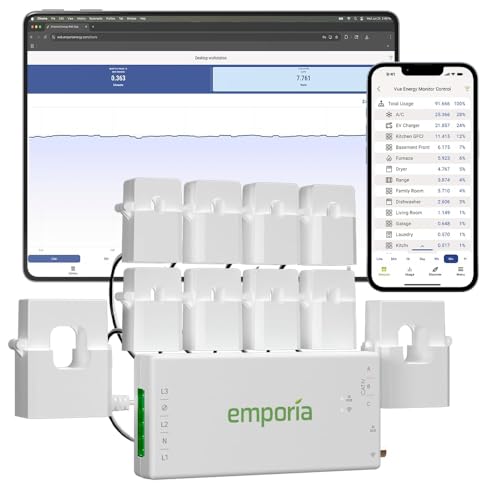
EMPORIA
Emporia Vue 3 Energy Monitor, 8 Sensors
$149.99
Measures the charger circuit and the mains directly at the panel, so your energy data comes from a current sensor rather than from a manufacturer cloud service. It keeps working regardless of what the charger brand does with its app in five years.
- Sensors
- 8
- Measures
- Mains and circuits
- Wi-Fi
- 2.4 GHz
- Location
- At the panel
Trade-off It reports, it does not control. Scheduling still has to come from the car or the charger.
Check priceGrizzl-E
Grizzl-E Classic 40A
$299.99
The deliberate non-answer: a charger with no network stack at all. Nothing to pair, nothing to drop, no cloud service to be discontinued, and the car handles scheduling. In a detached garage with poor signal this is often the better engineering decision.
- Wi-Fi
- None
- Output
- 40 A
- Case
- Metal
- Failure modes
- Very few
Trade-off No energy reporting, so verifying a time-of-use bill needs a separate monitor.
Check price
EMPORIA
Emporia Pro 48A with PowerSmart Load Management
$599.00
The case for connectivity that is not about convenience: this unit uses whole-home measurement to throttle itself and stay inside the service rating, which on a tight panel is what makes the circuit possible at all. Here the network is doing real work.
- Wi-Fi
- 2.4 GHz
- Output
- 48 A
- Load management
- Dynamic
- Circuit
- 60 A
Trade-off More expensive, and the load management feature needs its sensors installed at the panel.
Check pricePaid links. Prices shown when researched and change without notice.
The case for a charger with no radio in it
It is stronger than it sounds, particularly for a detached garage or an exterior wall. A Grizzl-E Classic has no network stack, no app, no account and no cloud dependency, which means it has almost nothing in it that can stop working for a reason unrelated to charging. Pair that with a panel-level energy monitor and you get better data than the charger app would have given you, from a device measuring actual current, plus visibility of every other load in the house.
The counter argument is real too: if your panel is tight, a connected charger with dynamic load management may be the thing that makes the whole project possible. That is a different purchase for a different reason, and it is the one connectivity decision on this site worth paying extra for.
How this page was researched
Charger connectivity behaviour, supported bands and offline operation come from published manufacturer documentation and specifications, together with verified owner reviews read in volume for recurring failure patterns rather than for star ratings. We do not perform hands-on product testing and never claim to. Network behaviour described here is general to consumer Wi-Fi equipment rather than specific to any router, and the terminology your router uses for band splitting and address reservation will differ.
Where to go next
If connectivity is the deciding feature, best smart EV chargers compares the apps and the reporting properly. If you would rather measure at the panel, the energy monitor roundup covers circuit-level monitoring. And if the charger is behaving oddly in ways that are not network related, EV charger troubleshooting works through fault codes, derating and ground faults.
Common questions
Why will my EV charger not connect to Wi-Fi?
The most common cause by a wide margin is band mismatch. Most EV chargers only support 2.4 GHz, and if your phone is on the 5 GHz or 6 GHz side of a network that shares one name across bands, the pairing process often fails. Temporarily giving the 2.4 GHz band its own network name, or forcing the phone onto it during setup, fixes a large share of these failures. The second most common cause is simply that the signal does not reach the garage wall where the unit is mounted.
Does an EV charger need Wi-Fi to work?
No, and you should confirm that before you rely on it. A charger is a safety device that negotiates with the car over the pilot signal in the cable, and that negotiation has nothing to do with your network. What Wi-Fi adds is scheduling, energy reporting, firmware updates and, on some units, load management. Test that yours charges with the network switched off, because a unit whose schedule lives only in a cloud app can fail in an unhelpful way.
Should I schedule charging in the car or in the charger?
In the car, in most households. The car knows its own state of charge, it keeps its schedule without a network, and it is the same schedule wherever you plug in. Schedule in the charger when the charger is doing something the car cannot, such as responding to a utility programme, sharing a circuit with a second unit, or throttling against whole-home demand. Setting the same schedule in both is the classic way to end up with a car that never charges.
What is the best way to get Wi-Fi into a detached garage?
A wired connection to an access point in the garage is the only really robust answer, and if a trench is already being dug for the feeder, running a data conduit alongside it is cheap insurance. Wireless bridging works but degrades with weather and foliage. A wireless mesh node with an outdoor rating, placed in line of sight, is the usual compromise. Data and power conductors have separation requirements, so the routing is a question for the electrician rather than a DIY afterthought.
Does a smart charger use much standby power?
Little enough that it is not a reason to avoid one. An Energy Star listing is a useful signal here because it implies a measured standby draw rather than an unstated one. Across a year the standby consumption of a connected charger is a rounding error next to the energy the car takes, and it is not a sensible basis for choosing between units.
What happens to my smart charger if the manufacturer shuts the app down?
It depends entirely on the design, and it is worth asking before buying. A unit that stores its schedule locally and charges normally without a network degrades gracefully into a plain charger. A unit that requires a cloud handshake to start a session does not. This risk is the strongest argument for either a deliberately dumb charger plus a panel-level energy monitor, or a brand large enough that the service is likely to outlive the hardware.
Getting your own panel and load numbers ready for an electrician? The EV Home Charging Install Planner is the paid version of these pages: 8 printable worksheets you fill in with your own numbers, plus the full PDF, $29.
How this page was researched
Specifications come from manufacturer documentation, listed safety certifications and verified owner reviews. We do not perform hands-on product testing and never claim to. Figures are researched planning information, not professional electrical advice. Last reviewed 2026-08-17.