Best Smart EV Chargers
Short answer
The best smart EV charger is the Emporia 48A at around $449, which delivers 11.5 kW on a 60 amp circuit with Wi-Fi and per-session energy reporting. Only two smart features reliably pay for themselves: energy reporting that verifies a time-of-use bill, and dynamic load management that can avoid a panel upgrade.
The best smart EV charger is the Emporia 48A at around $449. It delivers 11.5 kW hardwired on a 60 amp circuit, connects over Wi-Fi, and reports energy per session, which is the single smart feature that most reliably earns its cost. If you want the deepest software and the broadest utility program support, the ChargePoint HomeFlex hardwired at around $494 is the alternative.
The uncomfortable thing about this category is that most of what gets sold as smart is not worth paying for. Scheduling is the headline feature on almost every listing, and almost every electric car already schedules its own charging better than the wall unit can, because the car knows its state of charge and the charger does not. Remote start is a feature for a device you can walk to in ten seconds. What is genuinely valuable is narrower and less advertised: knowing how much energy went into the car and when, and having something that will hold the charger back when the rest of the house is drawing hard.
Top pick, smart home charger
Best smart charger
EMPORIA
Emporia Level 2 EV Charger, 48A J1772
$449.00
The smart charger with the best ratio of useful features to price. Hardwired 48 amps, Wi-Fi, and per-session energy reporting, which is the one smart feature that reliably pays for itself by letting you check a time-of-use bill against what the charger actually delivered.
- Output
- 11.5 kW
- Circuit
- 60 A
- Cable
- 25 ft
- Smart
- Wi-Fi
- Reporting
- Per session
- Install
- Hardwired
Paid link. Price shown when researched.
Which smart features are actually worth paying for?
Two out of seven, on an honest count. Everything else is either a duplicate of something the car already does or a convenience you will use twice and then forget about.
| Feature | Worth paying for? | Who it suits |
|---|---|---|
| Scheduled start and stop | Only if the car cannot schedule itself, which is rare | Older vehicles, plug-in hybrids |
| Per-session energy reporting | High on a time-of-use rate plan, because it audits the bill | Anyone on an EV rate |
| Dynamic load management | Very high on a tight panel, worthless on a roomy one | Full panels, 100 amp services |
| Utility program enrolment | High where a rebate or bill credit requires an approved charger | Check your utility list first |
| Remote start and stop | Low. You are asleep and the car is in your garage | Shared or guest charging |
| Firmware updates | Neutral. Fixes bugs, and is also a way features get removed | Everyone, unavoidably |
| Cost splitting and reimbursement reports | High if an employer reimburses home charging | Company car drivers |
Per-session energy reporting matters because a time-of-use rate plan is a claim you cannot otherwise check. The utility bills you for whole-house consumption in a window, and without charger data you have no way to separate what the car took from what the dryer took. With it, you can confirm that the overnight window really did carry the whole charging session, which is the entire premise of moving onto the rate plan in the first place. Work out what that is worth to you with the time-of-use savings calculator.
Dynamic load management matters for a completely different reason: it changes what the electrician has to install. A device that throttles or pauses the charger when the house draws heavily can let a 60 amp circuit fit on a panel that a load calculation says is full, and it is often the difference between a project that costs several hundred dollars and one that costs several thousand. That argument is worked all the way through in load management versus a panel upgrade.
What is the difference between monitoring and load management?
This is the distinction people most often get wrong, and it costs real money in both directions. A monitor measures. It clamps current transformers around conductors in the panel and tells you what each circuit is drawing, in an app, in something close to real time. It is genuinely useful: it gives you the measured peak demand figure that makes an optional-method load calculation defensible rather than theoretical, and it lets you see the charging session against the rest of the house.
A load management device controls. It watches the service and actively reduces or interrupts the charger's output when total draw approaches the limit. Only that second behaviour changes what the panel has to carry. Buying a monitor in the hope of avoiding a panel upgrade is the classic mistake, because a monitor with the best data in the world will not stop a main breaker tripping when the dryer, the oven and the car all run at once.
Some products do both. The Emporia Pro is a 48 amp charger with load management built in, which is the tidiest arrangement because there is one device and one installation. Standalone monitors like the Emporia Vue 3 measure without controlling. The full landscape is in load management devices and the hardware shortlist is in the energy monitor roundup.
Starter: connected without paying a premium for it
The entry tier here is a good place to be. All three units below charge at real Level 2 speeds and add connectivity for a small premium over their unconnected siblings. What you give up is app polish and, in two cases, some output.
Starter tier: $200 to $350
Connected 32 and 40 amp units where the smart features are an addition to good hardware rather than the reason the hardware exists.
Grizzl-E
Grizzl-E Smart 40A
$250.00
The cheapest connected unit worth owning. A 40 amp metal-cased charger, Energy Star listed and UL tested, with connectivity added to hardware that was designed to survive without it.
- Output
- 9.6 kW
- Circuit
- 50 A
- Case
- Metal
- Cert
- Energy Star
Trade-off The app is functional rather than polished. Buy it for the enclosure and treat the app as a bonus.
Check price
AIMILER
AIMILER 32A, 25 ft Cable
$199.99
A 32 amp connected unit with a Wi-Fi app and a 25 foot cable, ETL certified, on a 40 amp circuit. The right smart charger for a car that caps at 6.6 or 7.2 kW, where the extra amperage would be wasted.
- Output
- 7.7 kW
- Circuit
- 40 A
- Cable
- 25 ft
- Cert
- ETL
Trade-off Caps at 7.7 kW, so it is the wrong buy if a large-pack vehicle is coming.
Check price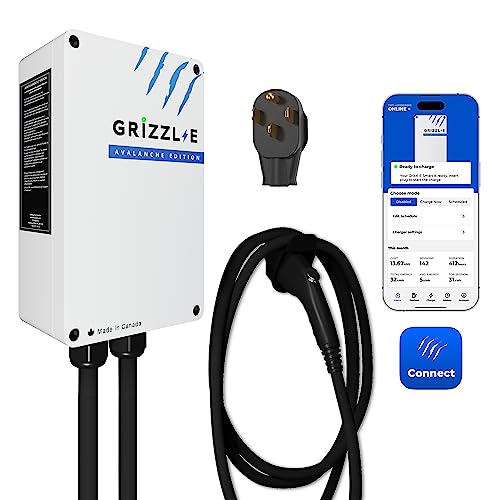
Grizzl-E
Grizzl-E Classic Connect 40A
$349.99
The Grizzl-E metal case with proper connectivity and energy reporting, which is the combination people ask for when they want an outdoor-tough charger that can still prove what it used.
- Output
- 9.6 kW
- Circuit
- 50 A
- Case
- Metal
- Smart
- Wi-Fi
Trade-off Fifty dollars over the non-connected Classic for data you may never open.
Check pricePaid links. Prices shown when researched and change without notice.
The Grizzl-E Smart is the best value on this page and possibly on the site. It puts a metal case, a UL test mark and an Energy Star listing at a price most plastic-bodied units cannot match, and the connectivity rides along on top. The right way to buy it is as a rugged charger that happens to be connected, which means you are not exposed if the app is ever discontinued.
The Grizzl-E Classic Connect is the same idea one step up, adding energy reporting to the metal enclosure. Ask yourself what you will do with the data before paying the difference. If you are on a time-of-use plan and intend to check the bill, it earns its keep in a season. If your car schedules itself and you never open an app, it does not.
Buy once: the smart chargers worth the money
The middle tier is where the software actually becomes a differentiator, because all three units deliver the same 11.5 kW or slightly more on the same 60 amp circuit. Nothing here charges faster than anything else here. You are choosing an app, a radio and a support organisation.
Buy-once tier: $449 to $529
Identical charging speed on the same circuit. The differences are software maturity, radio redundancy and utility program access.
EMPORIA
Emporia Level 2 EV Charger, 48A J1772
$449.00
The pick. Hardwired 48 amps with a factory whip, a 25 foot cable and per-session energy reporting at a price the premium brands do not approach for the same output.
- Output
- 11.5 kW
- Circuit
- 60 A
- Cable
- 25 ft
- Smart
- Wi-Fi
Trade-off A moulded enclosure rather than metal, so a sheltered mounting position is preferable.
Check price
ChargePoint
ChargePoint HomeFlex, Hardwired 50A
$494.00
The most mature software in the category, adjustable up to 50 amps on a 60 amp circuit, with the broadest integration into utility rebate and demand-response programs and a real support organisation.
- Continuous
- Up to 50 A
- Circuit
- 60 A
- Smart
- Wi-Fi
- Connector
- J1772
Trade-off You are paying a premium for software on hardware that charges at the same speed.
Check price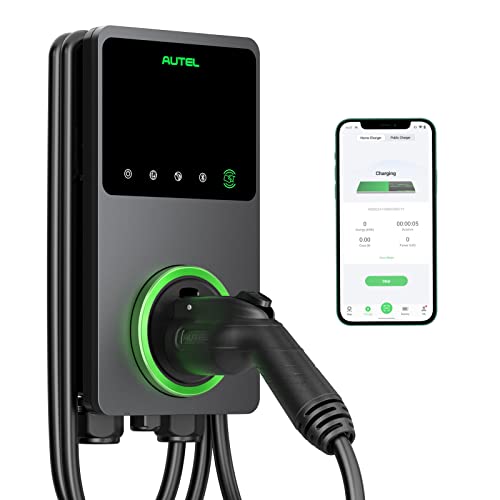
Autel
Autel MaxiCharger 50A Hardwired, 25 ft
$529.00
A 50 amp hardwired unit with a 25 foot cable and both Wi-Fi and Bluetooth. The second radio is the difference between a ten minute commissioning and an afternoon in a detached garage.
- Continuous
- Up to 50 A
- Circuit
- 60 A
- Cable
- 25 ft
- Radio
- Wi-Fi and BT
Trade-off The 50 amp setting needs the same 60 amp circuit and delivers barely more than 48 amps.
Check pricePaid links. Prices shown when researched and change without notice.
ChargePoint is the pick if a utility program is in play. Rebate and demand-response schemes frequently pay only for chargers on an approved list, and ChargePoint appears on more of those lists than anything else in the category. When that is true, the rebate often exceeds the price gap over a cheaper unit, which makes the expensive charger the cheaper purchase. Check the list first, and read rebates and tax credits for the order the paperwork has to happen in.
The Autel MaxiCharger 50A hardwired solves the problem nobody anticipates until commissioning day. A garage is one of the worst Wi-Fi locations in a house: behind a steel door, often on an exterior wall, sometimes detached entirely. A unit with Bluetooth as well as Wi-Fi can be set up and reconfigured from a phone standing next to it, whatever the network is doing. If the charger is going somewhere marginal, read EV charger Wi-Fi setup before you choose.
Ceiling: the tier that changes the electrical project
The top tier is not faster and it is not prettier. It is the only tier where the smart hardware changes what has to be installed, which is why it can be the cheapest thing on a project rather than the most expensive.
Ceiling tier: $199 to $599
One charger with load management built in, and two panel monitors. Buy in this tier to change the electrical work, not the experience.

EMPORIA
Emporia Pro 48A with PowerSmart Load Management
$599.00
The only pick on this page where the smart features change the electrical project rather than the experience. PowerSmart load management throttles or pauses charging when the house draws heavily, which is frequently what lets a 60 amp circuit fit on a panel that a load calculation says is full.
- Output
- 11.5 kW
- Circuit
- 60 A
- Load mgmt
- Built in
- Install
- Hardwired
Trade-off On a panel with genuine headroom it is a feature you pay for and never see operate.
Check price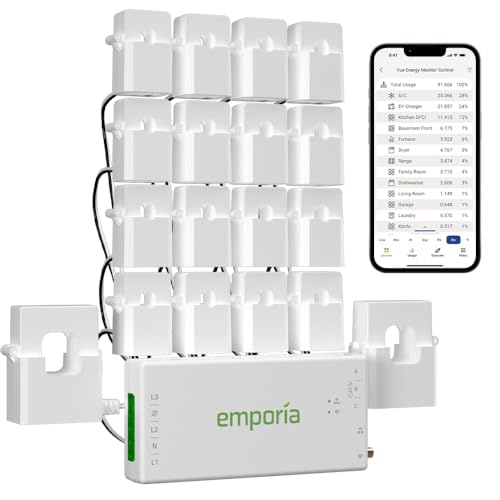
EMPORIA
Emporia Vue 3 Energy Monitor, 16 Sensors
$199.99
Whole-panel monitoring with sixteen circuit-level sensors, which gives you the measured demand figure a load calculation argues about and lets you see the charging session against everything else in the house.
- Sensors
- 16 circuits
- Mains
- Included
- Solar
- Supported
- Install
- In panel
Trade-off It monitors, it does not control. On its own it will not stop the charger tripping the main.
Check price
SIEMENS
Siemens Inhab Smart Energy Monitor
$267.75
A higher-capacity monitor with sixteen 50 amp circuit sensors and two 200 amp main sensors, aimed at a house where the EV circuit is one of several large loads being managed together.
- Circuits
- 16
- Mains
- 2 x 200 A
- Data
- Real time
- Install
- In panel
Trade-off Considerably more expensive than the Emporia monitor for a similar practical outcome.
Check pricePaid links. Prices shown when researched and change without notice.
Who should not buy the ceiling tier
Do not buy the Emporia Pro if your load calculation comes back with headroom. Its premium over the standard model is entirely the load management hardware, and on a comfortable panel that hardware sits idle for the life of the installation. Run the panel load calculator first. If the answer is comfortable, buy the standard unit and put the difference toward the install.
Do not buy a panel monitor like the Siemens Inhab expecting it to solve a capacity problem. It will not throttle anything. Buy it because you want the data, because you are building a case for an optional-method load calculation with measured demand, or because you want to see solar generation and household consumption together. If the goal is to fit a charger onto a full panel, you need a controlling device instead.
Do not buy any of the ceiling tier before you know your panel situation. All three are answers to a question that the load calculation asks, and buying them speculatively is how people end up with a monitor they never open and a service upgrade they still had to pay for.
How we chose these chargers
We did not test any of these units in person and we do not claim to. There is no lab, no instrumented garage and no sample hardware behind this page. Every pick is built from published manufacturer specifications, listed safety certifications and verified owner reviews read in volume for failure patterns rather than for star ratings.
Certification is the first filter and it is not negotiable. A UL 2594 listing, or an ETL listing to that standard, is the baseline for a device switching 240 volts at 40 or 48 amps for hours nightly, and an Energy Star listing is a useful secondary signal because it implies a measured standby draw. That last point matters more in this category than elsewhere: a connected charger has a radio and a processor running continuously, and standby draw on a poorly designed one is a small permanent tax on your bill.
The second filter is what the connectivity actually does. A unit that offers scheduling but not energy reporting is offering something the car already does. The third is offline behaviour: a charger must continue to charge normally when it cannot reach a network, and any unit where owners report charging failing along with connectivity is excluded. The fourth is failure pattern, particularly reports of cloud services being discontinued or features being removed by firmware update, which is a real and specific risk on a device with a fifteen year service life. Prices were accurate when researched and change without notice.
Buying tips for a smart charger
Check the utility rebate list before you shop
This is the single highest-value step in the whole process and it takes ten minutes. Many programs pay only for approved chargers, and where a rebate applies it frequently exceeds the price gap between a basic smart unit and the listed one. The order of the paperwork also matters, and getting it wrong can void the claim entirely.
Turn off one of the two schedulers
Charger scheduling and car scheduling conflict, and the failure is silent: the car wakes, finds nothing offered, and sleeps until morning. Decide which device owns the schedule on day one. The full argument is in smart charging and scheduling.
Test the Wi-Fi where the charger will hang, not where you are standing
Before the electrician mounts anything, stand at the exact mounting position with a phone and check the signal with the garage door closed. If it is marginal, either plan for a mesh node or buy a unit with Bluetooth as a fallback. Fixing this after a hardwired install is considerably more annoying.
Buy the enclosure for the location, not the app for the brochure
Software gets updated and replaced. An enclosure does not. If the charger is going on an exterior wall or into a detached garage, weight the case and the outdoor rating above the app, and check the outdoor roundup before you commit.
Assume the cloud service will eventually stop
Not as pessimism, as planning. Ask what the charger does with no network, and prefer units that fall back to charging normally. If the answer is that scheduling stops working, you have bought a dependency rather than a feature, and on a device you expect to keep for a decade or more that is worth knowing in advance.
Where to go next
If load management is the reason you are here, go straight to load management versus a panel upgrade and then load management devices. If time-of-use savings are the reason, read time-of-use rates and run the numbers in the time-of-use savings calculator. And if you are starting to suspect you do not need a smart charger at all, the main Level 2 roundup covers the unconnected options properly.
We review them on their own too, in full detail: the Emporia Pro, the ChargePoint Home Flex and the Wallbox Pulsar Plus.
Common questions
Do I actually need a smart EV charger?
Only for two reasons that hold up. The first is per-session energy reporting, which lets you verify a time-of-use bill against what the charger really delivered. The second is dynamic load management, which can let a charger fit on a panel that a load calculation says is full. Scheduling is not a reason, because nearly every electric car already schedules its own charging perfectly well.
Should I schedule charging in the car or in the charger?
Pick one and disable the other. If both are set, the classic failure is the car waking at its scheduled time, finding the charger offering nothing because its own window has not opened, and going back to sleep until morning. If you are on a time-of-use rate and want energy data, schedule in the charger. Otherwise schedule in the car, which knows its own state of charge.
What happens when the manufacturer shuts down the cloud service?
It depends on the design. Well-built chargers fall back to charging normally whenever the connection is lost, so a dead service costs you the app and nothing else. Poorly built ones lose scheduling entirely. This is a genuine risk on a device with a fifteen year service life, and it is the strongest argument for a deliberately unconnected charger if you do not need the data.
Is monitoring the same thing as load management?
No, and the difference matters more than any other distinction on this page. A monitor tells you what the house is drawing. A load management device actually throttles or pauses the charger when the house draws heavily. Only the second one lets you fit a charger onto a panel with no calculated headroom. Some products do both, most do only one, and the listings are not always clear about which.
Do utility rebates require a specific smart charger?
Frequently, yes. Many utility rebate and demand-response programs pay only for chargers on an approved list, usually because the program needs to send a signal the charger will act on. Check the list before you buy rather than after, because the rebate often exceeds the price difference between a basic smart charger and a listed one, which can make the more expensive unit the cheaper purchase.
Will a smart charger work if my garage has no Wi-Fi?
It will charge, because every listed unit falls back to charging when it cannot reach a network. What you lose is scheduling that the charger controls, energy reporting and any load management that depends on a cloud service. Garages are among the worst Wi-Fi locations in a house, behind a steel door and often on an exterior wall, so units with Bluetooth as well as Wi-Fi have a real practical advantage.
Getting your own panel and load numbers ready for an electrician? The EV Home Charging Install Planner is the paid version of these pages: 8 printable worksheets you fill in with your own numbers, plus the full PDF, $29.
How this page was researched
Specifications come from manufacturer documentation, listed safety certifications and verified owner reviews. We do not perform hands-on product testing and never claim to. Figures are researched planning information, not professional electrical advice. Last reviewed 2026-08-17.